
Geodata with PostgreSQL+PostGIS
A primer on saving and operating on geolocation co-ordinates (latitudes and longitudes) in PostgreSQL.
PostgreSQL with its peas-and-carrots extension PostGIS can help with geographical operations such as calculating the distance between two IP addresses. PostGIS natively supports the geography data type, which models the earth as an ellipsoid and not a perfect sphere (take that, flat-earthers!) - therefore distance calculations use surface-of-the-earth math (accurate!) and not 2D coordinate-system math (less accurate!).
Installing and Enabling PostGIS
Use PostGIS's official documentation to install PostGIS on most popular Linux distributions, Windows, and Mac. We suggest using the latest Ubuntu LTS image including on cloud platforms, and using PostgreSQL's official Apt Repository to obtain pre-built and well-tested PostGIS packages.
-- One time per database; run as the postgres user or another super-user account
CREATE EXTENSION postgis;
Create a Table with Point Geometry
Use the geometry(point, 4326) type in the CREATE TABLE command to establish a PostGIS type to hold a latitude, longitude pair. The other column here is of type inet which is an IPv4 or IPv6 address type in PostgreSQL. You can set these values using the JSON payload returned by the Fastah API.
create table ipgeo(
  ip inet unique,
  -- Remember: IP-based geolocations are always approximate!
  geolocation geography(point, 4326)
);
Storing Coordinates
While storing longitude and latitude values in the PostGIS-enabled table, the PostGIS utility function ST_MakePoint assembles a given longitude and latitude tuple into the point geography type with SRID 4326. The longitude and latitude are obtained from the Fastah API's locationData.lng and locationData.lat JSON attributes.
INSERT INTO ipgeo (ip, geolocation)
VALUES
  -- Melbourne, longitude = 144.94, latitude = -37.84
  ('14.1.72.1', ST_SetSRID(ST_MakePoint(144.94, -37.84), 4326)),
  -- Sydney, longitude = 151.20, latitude = -33.86
  ('116.91.211.1', ST_SetSRID(ST_MakePoint(151.20, -33.86), 4326));
Calculating Distance
Calculating the distance between the two IPs, one associated with Melbourne and the other with Sydney is now easy with the PostGIS built-in ST_Distance function. We use ROUND() liberally as all IP-based geolocations are approximate.
SELECT ROUND(ST_Distance(a.geolocation, b.geolocation, true) / 1000) AS distance_km
FROM ipgeo a, ipgeo b
WHERE a.ip = '14.1.72.1' AND b.ip = '116.91.211.1';
Visualization on a Map
Database UI explorer tools such as DBeaver auto-detect the PostGIS data type in the table data definition (DDL) and enable the handy "Spatial" exploration tab for your rows. Each marker on the map corresponds to one IP-associated row of the ipgeo table.
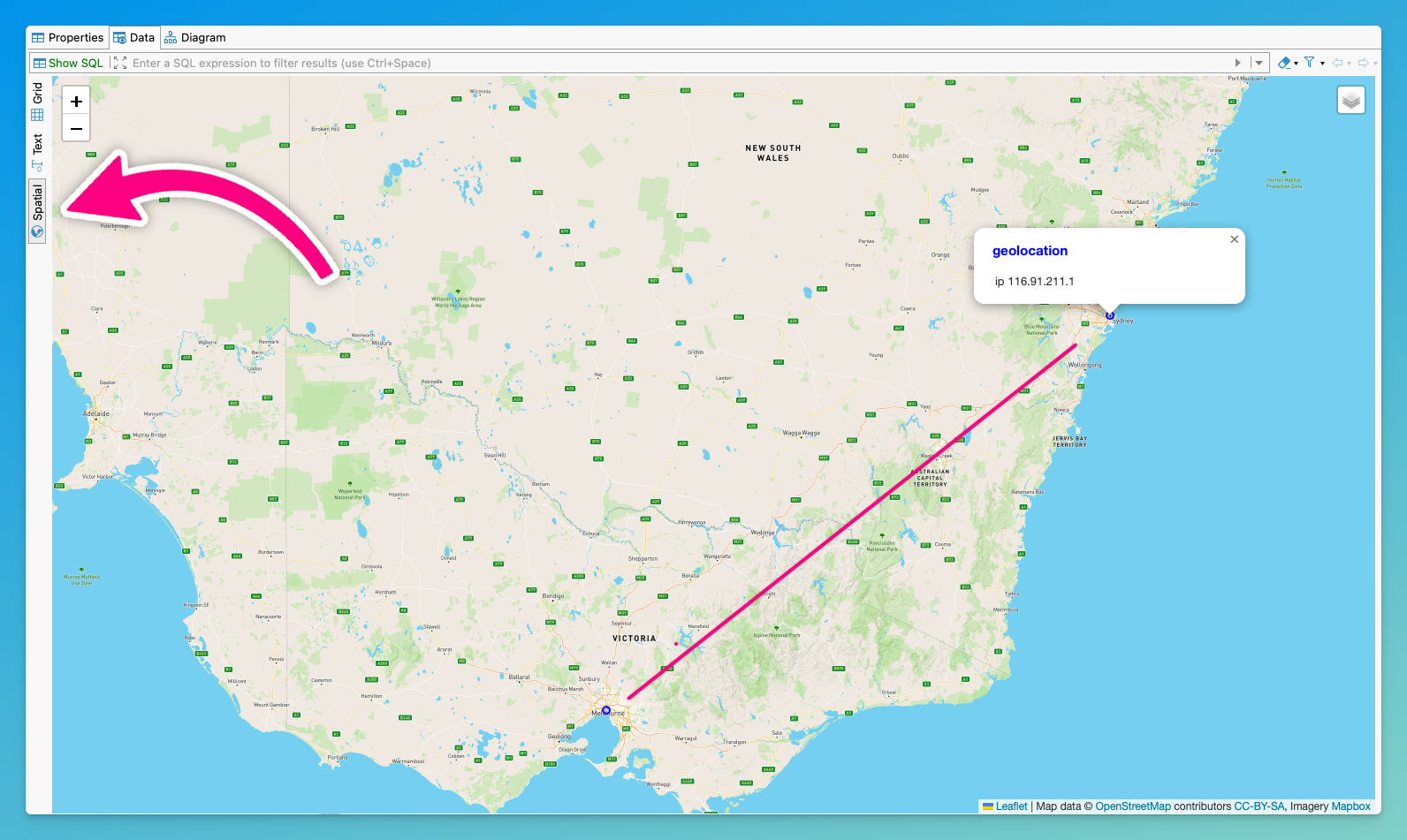
Distance calculation using PostGIS for IP addresses geolocations in Melbourne and Sydney
Updated 9 months ago